Face detection: finding a face in the frame
Think of the rectangle a camera draws around a face. The rectangle answers where is a face? It says nothing about whose face it is. Facial recognition goes further: it turns the face in that region into a numerical representation and compares it with a reference. Two different photographs can match even though none of their pixels line up exactly.
Consider an employee setting up face login for a benefits portal. A window behind her leaves her face in shadow. The camera may detect her face but capture too little detail for a reliable comparison. Before asking whether she matches a record, the portal needs a usable image of one person. A prompt to face the light is more useful here than an error saying her account was not found.
Alignment: making different pictures comparable
At registration, the employee used a laptop on a desk. At her next login, she holds a phone slightly to one side. Her face now fills a different part of the frame. Comparing the two whole images pixel by pixel would give the background, camera angle, and framing as much weight as her face.
Many recognition systems locate landmarks such as the eyes and use them to crop, rotate, and resize the face into a consistent position. This step is called alignment. It reduces differences caused by framing; it cannot recover detail lost to motion blur or reveal features hidden outside the frame.
Feature extraction: what a facial template contains
A recognition model converts the prepared face image into a list of numbers, often called an embedding or feature vector. These numbers are learned features, not a checklist such as eye color, nose length, and face shape. The goal is for different images of one person to have more similar representations than images of different people.
The FaceNet research paper gives a concrete example: its model learns a representation in which distance measures facial similarity. The exact representation and comparison method depend on the engine. A template is not an ordinary file checksum: changing the lighting should not make a genuine comparison as unrelated as two random files.
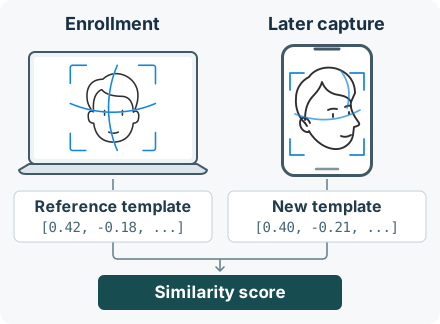
A template and an account identifier also serve different purposes. The engine uses the template for matching. Your website uses an identifier to find the associated account. In FACEIO, the selected recognition engine manages the biometric hash; FACEIO does not store, handle, or access that hash. Your application receives a Facial ID, not the feature vector.
Face matching: one reference or many?
In one-to-one verification, the reference is already known. For example, FACEIO ID Match compares a live selfie with the portrait extracted from the ID the user presents. It answers a narrow question: do these faces look like the same person? A match does not authenticate the document or establish the person's legal identity.
In one-to-many identification, the starting point is a collection rather than one supplied reference. The engine searches enrolled templates for a candidate. The closest candidate is not necessarily a match: even when the person has never enrolled, some record will be closer than the others. The system needs to be able to return no match.
How to read a similarity score
A score describes how similar the two representations are according to a particular model. A threshold sets the boundary for reporting a match. Suppose a similarity score is 87 on a scale where higher means closer: a cutoff of 85 would accept it; a cutoff of 90 would not. Those numbers illustrate the decision, not recommended settings. An 87 is not an 87% probability that the person owns the account.
A stricter threshold generally reduces false matches (different people accepted as a match) but increases false non-matches (two images of the same person rejected). This is why a single accuracy percentage tells a product team little about how often its customers will need to retry. NIST's one-to-one evaluations report the errors together at a specified operating point. Amazon Rekognition's threshold documentation shows how one engine applies the cutoff to search results.
What would a false match rate mean for your login?
Suppose you run two tests at the same threshold. In the first, employees try to match their own enrollment photos. In the second, you compare photos of different consenting participants. The denominators matter:
- Same person: If 20 of 1,000 genuine comparisons fail, the observed false non-match rate is 2%. That means 20 comparisons failed, not necessarily 20 distinct employees.
- Different people: If 2 of 10,000 different-person comparisons pass, the observed false match rate is 0.02%. That is not the chance that any particular successful login is an impostor.
These are hypothetical counts, not FACEIO benchmarks. They describe the matcher, not the whole login: a camera permission denial never reaches comparison, and a user may still fail a PIN check after a match. Counting either as a matching error would lead you to fix the wrong part of the experience.
For the benefits portal, test across the devices people actually use. If repeat attempts cluster around a backlit reception desk but not employees' phones, try changing the capture conditions before changing the threshold for everyone. NIST documents how exposure and camera angle affect genuine comparisons; a result measured with well-lit portraits need not carry over to that desk.
Why a match is not a liveness check
A photo of the employee can resemble her enrollment picture very closely. A matcher can therefore give a reasonable answer to the similarity question without answering the security question: is the employee actually at the camera? Liveness and anti-spoofing checks look for evidence about the capture itself rather than just the identity of the face.
FACEIO also enables PIN Code validation by default. A matching face alone does not supply the user's PIN. These controls complement one another; none guarantees that every replay or deepfake will be detected. Review the liveness and PIN settings before rollout, and give users who cannot complete the camera check a separate recovery path.
What your website does with a FACEIO match
For the benefits portal, the two user actions belong in different places. During sign-up, obtain the user's consent and call enroll() to register the new user in your application. Associate the returned Facial ID with the correct account. When the enrolled user comes back, call authenticate() for sign-in. A failed sign-in is not a reason to automatically register another user.
A recognition result does not decide what the employee may do. Your backend is responsible for establishing a trusted session and checking permissions: signing in to view your own benefits does not grant access to a colleague's records. For the distinction between the matching operation and the rest of a login, see What Is Face Authentication?
Give the user a next step that fits the failure
fioErrCode.NO_FACES_DETECTED: No face was detected in time. Help the user check the framing and lighting; there is no match result to interpret.fioErrCode.UNRECOGNIZED_FACE: No enrolled user was recognized. Offer another attempt or the account's recovery route. Do not create a second registration to make the error go away.- Successful sign-in, restricted record: If the employee can see her benefits but cannot open a colleague's file, the permission check is working. Repeating the face scan should not change what she can access.
The fio.js error reference also distinguishes camera permission problems from capture and recognition failures.

Test registration and sign-in on your website
Create an application in the FACEIO Console, then follow the five-minute setup guide to load fio.js with your Public ID and try the two flows.